
If you are using a rolling release distro like Arch, you might have noticed that your home directory now has a new member, a new folder called “Projects”.
For as long as I remember, Linux has always had a set of default folders under the home directory. Usually they are Documents, Music, Pictures, Videos and Downloads. Templates, Desktop and Public folders are also there.
Now we have a new addition in the form of “Projects”.
I like this idea. I’ve been doing pretty much the same thing for a while now, though it’s been a subdirectory of Documents.
This is the way. Everything I created in folder in Documents. Everything I downloaded in downloads. Home should be otherwise empty, except for all the left-over dot-folders that old software leaves lying around.
Mine is on the desktop 🤷🏼♀️
I made SO MANY directories under home that could have just been ~/Projects that I’m annoyed with myself for not doing something so simple.
… I’ll be using the projects directory heavily going forward
As someone who has used ~/Projects for years and has syncing and other setup around it I am (very slightly) terrified this change could somehow fuck with me.
Please let this just be a mkdir call that will fail.
I also use a Projects folder. It looks like it probably won’t break anything. Apps might start putting stuff there by default, hopefully in sensible subdirectories. There’s a note in the article that you can create
~/.config/user-dirs.dirsto specify where you want files to go.Nope. Only makes for new installs, and only uses it as a save spot default if the application asks for it. Should be no change at all.
New installs, or new users? I’d assume the latter?
When I read it originally (a bit back, maybe a week or two ago) it was new installs that was noted, though new users would make sense.
I guess I’ll find out soon enough on a test box.
I’m on Artix Linux and it did automatically create it after an update.
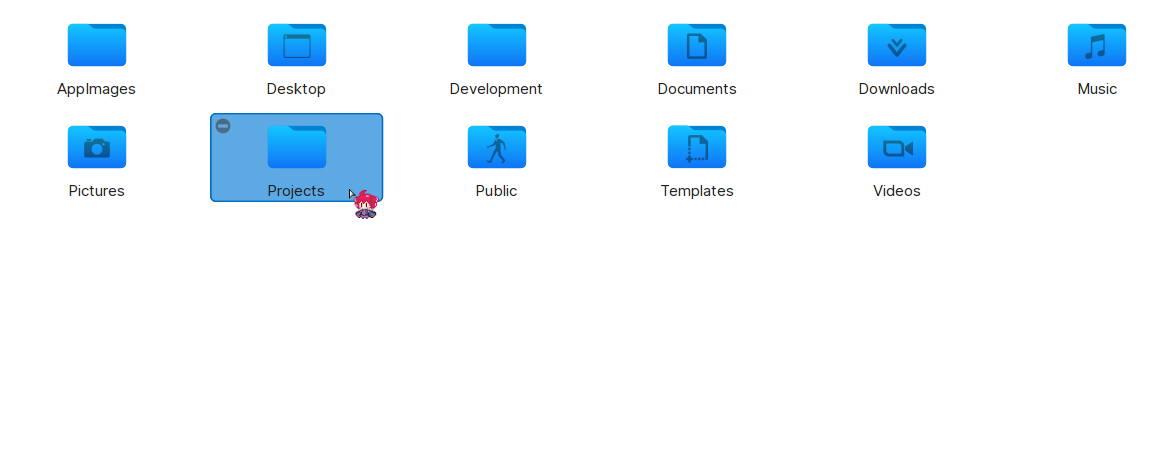
It likely just runs xdg-user-dirs-update which, in my experience, doesn’t delete anything if the folder is already there (the command just changed the folder icon in the file manager when I used to run it on a WM).
it’s excessive for me. I’ll continue putting my projects with my documents.
I think that’s what normal people have been doing for decades.
I wish they would combine Pictures and Videos into Media.
Oh, that’s what I do, you just have to customize it. I have media with images, music and videos inside.
And Music? But they’d still need subfolders to keep the content organised and then it begs the question why hide it all away a whole layer lower down from the Home folder?
Pictures and Videos typically refer to personal media, whereas music would refer to professional media. I don’t think grouping them into a single media directory would usually make sense.
Why? What would I want to have the folder for? I never had it with any OS I ran. It’s either in the documents, or I’d create my own directory with the name I want. I have different types of projects, so I’d prefer organising my directories myself.
I wasn’t sure the fuck this directory keeps appearing in my home, kept removing it over and over again. Can I disable that?
Aha, it’s in the article:
Don’t like the new Projects directory? Just delete it. The xdg-user-dirs utility will not try to create it again. The default location for this directory will be moved to your home directory.
It recreates them for me.
Power users, who want more control, can edit the ~/.config/user-dirs.dirs configuration file and modify it to control what goes where.
This might help, I guess.
At least projects is an understandable purpose, I don’t use the
Templates, Desktop and Public foldersat all, and aside from desktop (which I know is a workflow thing that I don’t even use) I would need someone to explain them to me. I’m guessing public would be for a multi-user system, templates maybe for printing stuff (I do not).Templates is super useful! You can make a copy of any file you put here in any other directory with right click > new. Some examples I usually have in my computers are ‘newFile’, ‘newTextFile.txt’ (just blank text files), ‘newTextDocument.odt’, ‘newSpreadsheet.ods’… but once you start you’ll find many more things to add like, if you’re a programmer or web dev you’ll put files with all the boilerplate already in them, if you design fashion you’ll put an image of a figure template to draw over (in your format of choice), you have to make monthly schedules? Throw a table/spreadsheet with the days, format, colours… already in it. Anything you find yourself repeating is a good candidate to go into your templates folder.
Interesting. I guess I’m not that far along (sort of stalled now), and quite possibly may never really need that.
Though for this one:
Some examples I usually have in my computers are ‘newFile’, ‘newTextFile.txt’ (just blank text files)
creating a blank file and renaming to .txt before editing seems good enough for me.
I think Templates is for cases where you make lots of documents that have the same starting structure. Like a letter head, or a spreadsheet you recreate every month. The starting structure can be saved in Templates so you can copy it ever time you need it. Maybe I’ll put a Nix flake template there instead of always copying from a recent project.
Public might be for files that other users have read access to on a multi user system? Or maybe for network shares? Or a personal website? I’m not sure. Edit: I found a comment saying that Gnome file sharing uses Public.
Templates are auto-used by some software, but I don’t understand why it’s not hidden. E.g. .templates or some .app/share/templates. As not many people would ever use it, and those who will would find the location easily.
Desktop, I never used it, but I understand the workflow. I used it as a quick directory to send some files, which I could symlink. Some people use it. And some DEs show desktop files.
Music and videos, I see no point. Not many people use them at all, and for me those were separate disks (which I never needed mounted in my home). Now, it’s all separate machines (for self-hosted media content and servers).
I use only documents and downloads, and in general, that’s enough for me. Also I use some top level directories, and I name them myself. All my files are my projects, I see no point in having any other files in my home.
I have a .hidden file to hide the rest.
I do use music and video (Flash animations in video too), though yeah they have been moved to slower drives (because data, easier migration). I use XFCE but don’t use desktop icons.
Its amazing how bothered people are by a fucking folder 😂
Forcing their facist file structure on is is literally wors than windows!
/s
A whopping 2KB of unwanted bloat.
Everyone knows all a proper OS need is 32KB, at most…
I came here expecting people ranting over it. Let’s see what they have…
the “for as long as I remember, Linux has always had a set of default folders…”
lmao…
they’ve been bugging me with their presumptuousness for decades.
They can’t ask if we want those things?
Sure, I can understand people coming-from the MS-Windows paradigm needing such things done for them, but to just presume that everybody wants the defaults?
Why not simply ask, in the 1st-login, if the user wants such defaults?
Opt-in, rather than opt-out, you know?
I add a ~/prog directory, that I’m certian many who either program or are trying to learn programming, add.
Does that mean it ought be a default?
Why would I want a Public folder in my homedir?
_ /\ _
I’m more of a fan of /Projects
then syncthing that between all my boxes.
~home is great on shared systems, but my projects should be in the same place for all my local accounts on my non-shared box.
I love this! Now to remove other unwanted folders like
templatesandmusicThe article should also mention the new XDG variable itself, please.
And also, the XDG people should’ve thought of a more flexible way, that allows unlimited custom icon-directory associations. Now, we have some file managers, that do it their own way, most don’t allow custom directory icons.
Pure bloat. I will be personally switching to the Hurd Kernel just because of this change.
/s right?
Even if I am against this kind of “defaults”, today I learned how you customize this for any folder in the home directory !
For linux based system, you do like told in https://www.freedesktop.org/wiki/Software/xdg-user-dirs/
~/.config/user-dirs.dirs specifies the current set of directories for the user. This file can also be modified by users (manually or via applications) to change the directories used. Note: To disable a directory, point it to the homedir. If you delete it it will be recreated on the next login.
So at last I disabled Music, Templates, Pictures and Videos . Cleaner Home !
Huh time to delete projects folder and use Projects folder
Now make all of default XDG directories lowercase. Nothing else is capitalized in the file system - why do these directories get an exception?
Yessssss
Edit the user-dirs.dirs file, done.
Yeah I know and KDE ans Gnome both have settings for this but as I used to setup a lot of machines it was always frustrating that the default is uppercase and some idiots don’t actually read the XDG preferences and have default uppercase directories hard coded
Oh wow I wish I knew this was possible earlier. Thank yoooouuu
You are supposed to use these often
Yes, that is the reason to make them lowercase, so I don’t have to shift when using the terminal to access my most used directories.
But why are the names camel cased? It’s a little bit more annoying to type.
Because any normal person would want it upper cased. Most people never type these folder names.
Yes, Linux should appeal to the masses, otherwise we will never get rid of Windows. No, this doesn’t apply to anyone on Lemmy cause nobody on Lemmy right now truly qualify as “normal person”, statistically speaking.
i feel normal but nobody knows that i am wearing Batman socks.
… until now.
Yours are camel case? That’s weird. My folders are pascal case.
Indeed, fixed.
Seconded, I hate that every file is all lowercase but my home directory if filled with Downloads, Videos, Documents, etc…
You can customize the names with a
~/.config/user-dirs.dirsfile. That will work on XDG-compliant programs. instructionscd downloads
nO sUcH FiLe oR DiReCtoRy
time for a new shell or enable ‘set completion-ignore-case on’ in bashrc
Windows user appeal?
And Mac.
Hell, Mac even capitalizes /Users (where home folders are)!
– Frost
Appeals to Java programmers too.
So does self-flagellation, but we don’t provide default whips in the Kernel.
I’ve always had a projects folder, so this works for me I guess.
Same I also keep one called “scratch” that is just for random one off shit
/s
I used to have a scratch directory. Then I realized I can put stuff in /tmp/whatever, and it gets automatically deleted on reboot. I made a shell function that creates a /tmp subdirectory, and cds to it in one command.
Well, sometimes I want something more permanent than tmp
That’s better than mine: ~/downloads/deleteme123
My downloads folder already removes files that are over a month old
Same, I picked it up from some random user I was watching.
It may as well be called ‘git folder’ because it’s almost exclusively used to clone ‘hmm, neat’ github repos and for my various ‘to do’ projects where I’ve gotten as far as running
git init.I have two folders for git though, my projects, and other people’s packages and such
That makes too much sense
Me too! But now I’m thinking maybe I should capitalize the folder name
~/PROJECTS
Why capitalize? Drop all the vowels!
~/prjcts
Sigh… Yet another thing pushed by the self-appointed nannies at freedesktop.org that I will have to manually undo on practically every new account.
At least it will probably be configurable, unlike Canonical’s infamous
~/snapdirectory.Or flatpaks var directory.
I don’t mind that one, since
.vardoesn’t clutter my home dir and is only created if I use Flatpak. It follows unix conventions, stays out of my way, and is only a few lowercase letters to type if I choose to work with it.But not configurable for ease of backup.
I don’t know what you’re referring to. How would changing the location of dotfiles make backups easier?
Data & config stuff here, cache & trash there.
I guess I didn’t think of that approach because it wouldn’t work for me. I use a lot of tools that follow the long established convention of putting dotfiles directly under $HOME, so I back up $HOME and exclude things like cache and trash.